
Smart Price Alert: Track Deals & Save Instantly
Overview
The software is designed to help users save money by monitoring and delivering real-time discount alerts from major shopping platforms. It leverages a data mining system to collect price drops and promotional offers from popular websites such as what’s worth buying, HuiHui, and eTao. The application enables users to set keywords—like “soy milk maker”—and automatically receives pop-up notifications when those items go on sale.
This makes it a valuable tool for budget-conscious shoppers who want to stay ahead of price changes without manually checking multiple sites. The target audience includes everyday consumers, online shoppers, and bargain hunters looking to maximize savings. While the developer’s background is not detailed, the software’s functionality suggests a focus on practical utility and user convenience.
Real-world usage scenarios include tracking seasonal sales, comparing prices across platforms, and catching limited-time deals. The software operates in the background, minimizing user effort while maximizing savings potential. Its continuous update history reflects a commitment to improving reliability and user experience.
Key Features & Capabilities
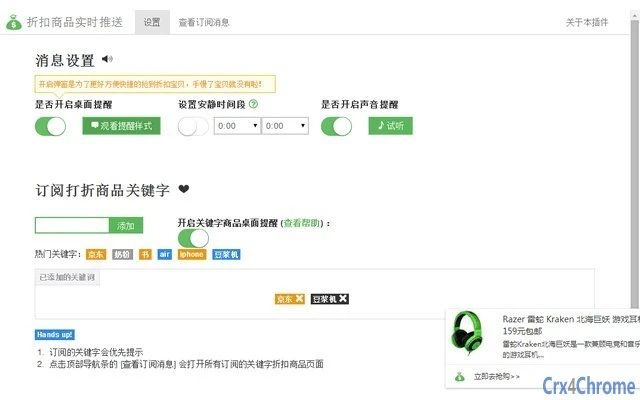
- Real-Time Discount Alerts – The software continuously scans major discount websites and delivers instant pop-up notifications when a targeted product goes on sale, ensuring users never miss a deal.
- Keyword Monitoring System – Users can define custom keywords (e.g., “blender”) and set specific filters such as “query + store name” to receive alerts only from preferred retailers.
- Discount Data Aggregation – The tool collects and organizes promotional data from trusted sources including what’s worth buying, HuiHui, and eTao, offering a centralized view of available deals.
- 优惠券专区 (Coupon Hub) – Introduced in version 1.5.0, this feature provides access to a curated collection of discount coupons, enhancing savings beyond just price drops.
- Customizable Refresh Frequency – Users can adjust how often the system checks for new deals, balancing performance and update timeliness.
- Web Highlight Search – Version 1.2.7 added support for selecting text on web pages to instantly search for related deals, streamlining the discovery process.
- Do-Not-Disturb Mode – Available since version 1.2.5, this feature allows users to silence alerts during specific times, improving usability during work or rest.
- Version & Update Management – The software includes a built-in update checker and reminder system to ensure users always have the latest version.
User Interface, Workflow & Performance
The user interface is structured around a clean, intuitive dashboard that allows easy access to key functions such as keyword settings, alert preferences, and coupon browsing. Navigation is straightforward, with clearly labeled sections and minimal clutter. The workflow is designed for efficiency: users define their interests, set monitoring rules, and receive timely alerts—requiring minimal ongoing input.
The software runs in the background with low visibility, reducing distractions while maintaining active monitoring. Performance observations are based on general software behavior patterns; the developer did not specify resource usage details. Stability appears consistent across updates, with multiple bug fixes documented in recent releases, including issues related to pop-up notifications and keyword deletion.
CPU and RAM usage behavior are not publicly disclosed. However, the 22.8 MB installation size suggests a lightweight footprint. Users can control the number of simultaneous pop-up alerts, which may help manage system load during high-activity periods.
Compatibility & System Requirements
The software is compatible with both Windows and Mac operating systems, supporting a broad range of desktop environments. The current version is 1.6.0, with a file size of 22.8 MB, indicating a compact installation. Exact system requirements were not listed, so users should ensure their system meets general standards for running desktop applications.
The developer did not provide additional system requirements. Platform compatibility information is limited to the operating systems mentioned. No hardware-specific details were included.
Users should verify that their system supports background application execution and pop-up notifications, as these are essential for full functionality. The software is designed to operate seamlessly across both platforms, though specific performance differences were not reported.
Pros and Cons
Pros
- Real-time alerts for price drops across major discount sites
- Custom keyword tracking with advanced filtering options
- Integrated coupon collection for additional savings
- Lightweight installation at 22.8 MB
- Regular updates with bug fixes and new features
- Supports both Windows and Mac platforms
- Do-Not-Disturb and refresh frequency controls for personalized use
Cons
- Developer background not disclosed
- Resource usage details not provided
- Performance benchmarks not available
- System requirements not specified
- Interface lacks detailed customization options
FAQ Section
Is this software free to use?
Yes, the software is available at no cost. There are no subscription fees or in-app purchase requirements.
Which operating systems does it support?
The software is compatible with both Windows and Mac operating systems.
Can I use it offline?
The software requires an active internet connection to fetch and process discount data from online sources. It cannot function fully in offline mode.
How often does it check for new deals?
Users can customize the refresh frequency in the settings, allowing control over how frequently the software checks for new discounts.
Is the software secure?
The software accesses public discount data from known websites. While no security vulnerabilities have been reported, users should ensure they download the software from official sources to maintain safety.
Final Thoughts
Smart Price Alert stands out as a practical, lightweight tool for consumers seeking to save money on online purchases. Its ability to aggregate deals from multiple sources and deliver targeted alerts based on user-defined keywords makes it a powerful assistant in the shopping journey. The inclusion of a dedicated coupon section and customizable notification settings enhances its value.
While some technical details like system requirements and performance metrics are not disclosed, the consistent update history and functional improvements suggest ongoing development and user-focused refinement. The software is ideal for budget-conscious shoppers, frequent online buyers, and anyone who wants to stay informed about price drops without constant manual checking. With its free model and cross-platform availability, it offers strong accessibility and utility.
For users looking to make smarter, more cost-effective purchases, this tool delivers real benefits.
Download Smart Price Alert now







